Apple Enhances Creator Studio with Advanced AI Features Across Key Applications
Apple has rolled out significant updates to its Creator Studio applications, notably enhancing capabilities with advanced AI features integrated into Pixelmator Pro, Final Cut Pro, and Logic Pro. These improvements signal a shift towards more fluid workflows and increased productivity for content creators, giving professionals a stronger toolkit in an increasingly competitive environment.
Interconnected Updates Across Applications
One of the standout enhancements is the integration of Pixelmator Pro with Final Cut Pro and other Apple productivity apps like Keynote, Numbers, and Pages. Now, Final Cut Pro users can easily send frames for thumbnail creation and social media graphics directly to Pixelmator Pro. This synergy between applications reflects a strategic move by Apple, enhancing user experience by allowing seamless transitions across platforms. Meanwhile, the office applications support generating vector shapes via AI, reducing time wasted in manual design efforts. Furthermore, users can quickly edit images sourced from their documents in Pixelmator Pro, with any changes automatically reflected in the original files. That’s a boon for efficiency, eliminating the cumbersome steps previously involved in editing visual assets.
Pixelmator Pro's Advanced Functionality
In Pixelmator Pro, new features include advanced image generation capabilities where users can create images from text prompts, coupled with a Content Hub that offers curated collections of images. This not only speeds up the workflow but also opens avenues for creative exploration—something artistic users will surely appreciate. The integration extends to Freeform on iOS and macOS systems, enhancing collaboration across platforms. The inclusion of AI means users won’t just work faster; they can also push their creative boundaries without getting bogged down by technical constraints.
Final Cut Pro Innovations
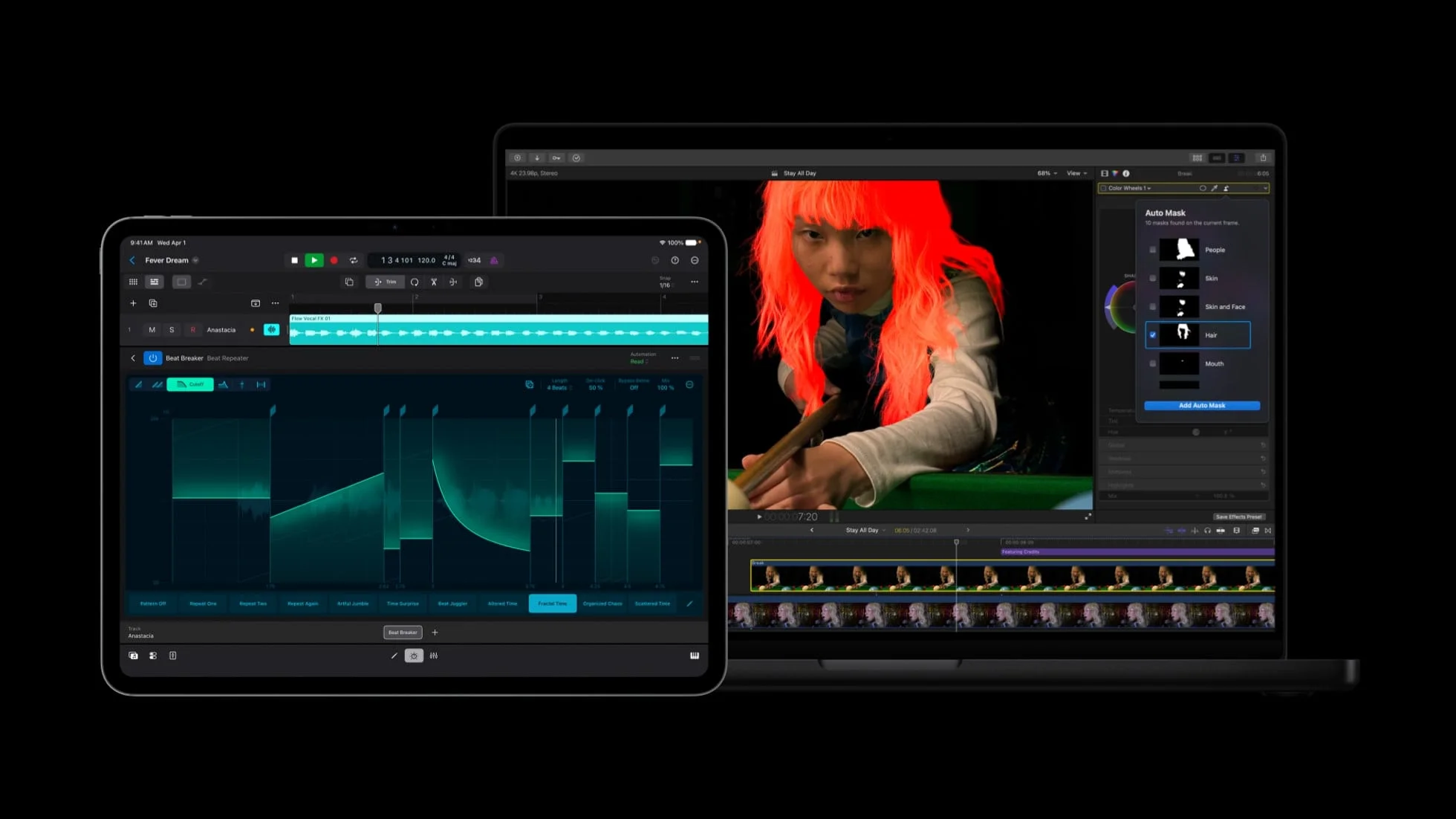
Moving to Final Cut Pro, the introduction of the Generate Captions feature allows for on-device AI-generated subtitles, which can be styled with various animations, fonts, and colors. This is more significant than it looks. Efficient captioning can save hours of manual work, particularly for video content tailored for social media or accessibility. Another valuable addition, Edit Detection, analyzes rendered videos and can deconstruct them back into original clips. This technology is a game-changer for content revision, allowing quick highlight creation for social platforms without losing the essence of the original edit.
For Mac users, Final Cut Pro's enhanced Auto Mask tool intelligently isolates video elements such as skin and clothing. This facilitates smoother editing without requiring manual tracking—a feature many editors will find invaluable. Imagine the hours saved from manually rotoscoping! Color Match has also improved, offering more natural color corrections in varied lighting conditions. Advanced Trimming allows for detailed manipulation of clips, letting users adjust frame entries and exits meticulously, which can dramatically improve storytelling in video editing.
Motion and Compressor Enhancements
The Motion application now supports vector graphics scaling, ensuring quality is maintained regardless of size adjustments—a common pitfall in graphic design that can lead to unsatisfactory results. Meanwhile, Compressor features an Immersive Metadata Viewer, tailored specifically for the Vision Pro. This kind of targeted enhancement shows Apple’s commitment to meeting the needs of professionals demanding more from their software in terms of visual output quality.
Logic Pro and MainStage Improvements
Logic Pro received a facelift with a refined Chord ID feature that enhances the responsiveness of session players. This is critical for musicians and producers who rely on quick transitions during chord changes. In both Logic Pro and MainStage, the introduction of a granular sync mode in Alchemy opens avenues for innovative sound design. Here’s the thing: faster, more responsive tools can fuel creativity in ways that static features simply cannot. Musicians thrive on flow, and these updates promise to keep the creative juices flowing.
Pricing and Accessibility
For more details on these updates, visit Apple's official page. The Creator Studio Pro package, which includes access to all Apple creative software, is available for around $13 per month or $129 annually. The sharing options for up to six users cater to collaborative teams, making this suite an attractive option for agencies or partnership projects.
Looking Ahead: Implications for Content Creators
The implications of these updates reach beyond the mere addition of features. If you're working in this space, the integration of AI across various applications points to a fundamental shift in how content creators will approach their work. Increased automation means less time spent on mundane tasks and more focus on creativity and quality. As AI technology becomes more ubiquitous, studios that adopt these tools will likely stand out in an overcrowded marketplace. The question is: will competitors keep up? The increasing focus on interconnectedness and AI-enhanced capabilities may drive the next wave of software development across the industry.
This article, "Apple Creator Studio Gets New AI Features" first appeared on MacRumors.com
Discuss this article in our forums