Google Maps on Android Auto Finally Includes Live Speedometer Feature
Google Maps is closing a major feature gap in Android Auto by introducing a live speedometer, a function that has long been available on Android phones and more recently on Apple CarPlay. This update aligns Android Auto more closely with the capabilities of its competitors, marking a significant enhancement for users.
Understanding the Update
The introduction of a live speedometer in Android Auto not only addresses a prior shortcoming but also positions Google Maps to compete directly with similar navigation and infotainment systems. For far too long, users of Android Auto lacked features that have become standard on both competing Android devices and Apple CarPlay. This isn't just a minor tweak; rather, it's a step toward leveling the playing field, enhancing the functionality that users expect from a modern driving experience. Think about it—most drivers already rely heavily on their mobile devices for navigation, so having a live speed indicator alongside navigation directions makes intuitive sense.
The feature's availability appears to be quite limited at this stage, currently rolling out only to a select group of Google Maps beta users operating version 26.29.02.946673643. Reports from users suggest that at least one Canadian driver has successfully accessed it, hinting at a gradual server-side rollout rather than a widespread update. This rollout strategy might be part of a phased testing approach, allowing Google to gather user feedback and address any bugs before a widespread launch. However, this selective rollout can be frustrating for many users who are eager to access new functionalities.
The Functionality In Focus
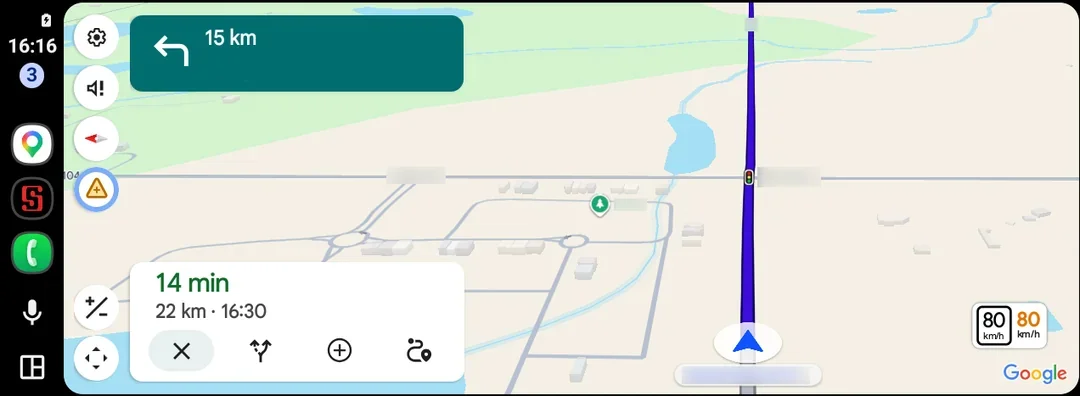
When enabled, the live speedometer displays your current speed alongside the speed limit indicator. Notably, the speed readout changes color if you exceed the speed limit, allowing drivers to monitor their speed more safely without diverting their attention from the road. This feature can be particularly beneficial in locations where speed limits frequently change, such as construction zones or urban areas. Given that distractions are a leading cause of accidents, this change could help improve driving safety by keeping critical information front and center.
Just a Supplement? Really?
It's important to note that Google advises users to consider this speedometer a supplementary reference, not a replacement for their vehicle’s built-in speedometer. While this caution is understandable—digital displays can sometimes lag behind real-time data—many drivers might find this dual reliance cumbersome. In an age when smart technology bolsters safety, why shouldn't it also replace outdated traditional gauges? The delay in bringing this feature to Android Auto has been somewhat perplexing, given that the platform has historically lagged behind its counterparts. If you're working in this space, you have to wonder why it took so long to implement a feature so basic yet beneficial.
Broader Enhancements on the Horizon
This update exemplifies Google’s ongoing efforts to enhance the functionality of Android Auto as it rolls out further navigation upgrades. These include an immersive Maps interface equipped with 3D building visuals, refined lane instructions, and clearer highway interchange guidance. Each of these features aims to make navigation smoother and reduce the cognitive load on drivers. However, much like the live speedometer, these enhancements feel overdue. They should have been part of an earlier vision for a unified driving experience.
Reflections on the Update
While this update might be seen as overdue, it does enhance the driving experience by reducing the need for drivers to look down at their dashboards, particularly in areas with variable speed limits. But just like any tech improvement, it has its limitations. This is more significant than it looks. Yet, it would be refreshing to see Google prioritize practical features alongside more flashy enhancements that, while impressive, may not significantly improve daily usability.
Future Outlook
Looking ahead, the implications of this update are wider than simply enhancing user experience. Google needs to consider how quickly they can scale features like this to the broader user base. As electric and autonomous vehicles evolve, the integration of smart technology will only become more pertinent. Traditional in-car systems can't evolve quickly enough to meet user demands, which could turn into a crucial differentiator among platforms.
Thus, while the addition of a live speedometer is a move in the right direction for Android Auto, it's a signal that Google must remain agile. Users expect continuous enhancements that don't just close gaps but also anticipate future needs. It's not just about catching up—it's about leading the way. And this is the part most people overlook: what works today may not be sufficient a few years from now, especially as technology and user expectations continue to shift rapidly.