Secure Your PSN Account: Easy Workaround for 2FA Issues on the PlayStation App
Sony's latest decisions have irked many in the gaming community, but today, I'm focusing on a practical solution for an all-too-common dilemma: accessing the PlayStation app when two-factor authentication (2FA) fails. Users often encounter frustrating situations when trying to log into their accounts, especially if 2FA is enabled for security. The increasing reliance on such security measures can both safeguard our information and complicate access — a paradox that affects many PlayStation users.
Recently, after signing out of my secondary PSN account, I aimed to log into my primary profile, only to find that the crucial authentication text messages weren't arriving. As the weekend began, it quickly became clear I'd have to navigate this issue without support until Monday. Forgetting passwords or losing access isn’t just an inconvenience; it’s a significant barrier in gaming. For many, the PlayStation App is not only a tool for gaming; it serves as a central hub for managing accounts, purchases, and social interactions. When access is abruptly severed, the impact is felt beyond just the loss of gameplay.
Accessing the PlayStation App When 2FA Fails
Your best bet in such situations is to use backup codes. However, they're notoriously difficult to find, as many PlayStation users can attest. This indicates a broader issue with user education around security protocols. If you're like me and misplaced your backup codes, here's a practical step-by-step approach to regain access:
1. Launch the PlayStation app and tap Sign In.
2. Input your email address and select Next.
3. Instead of entering your password, click on Trouble Signing In?.
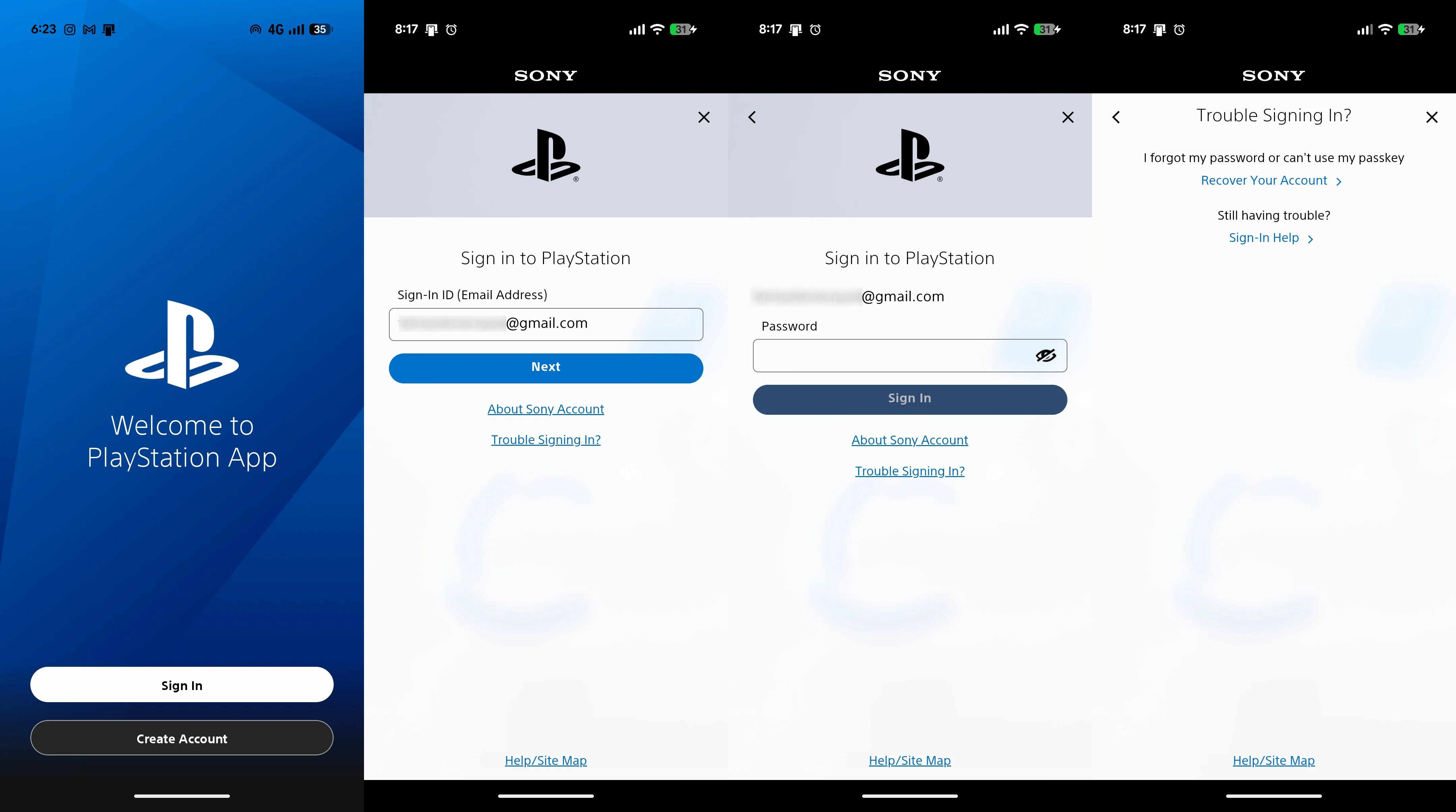
4. Select Recover Your Account to reset your password.
5. You're directed to the account recovery portal. Enter your email and click Send Link.
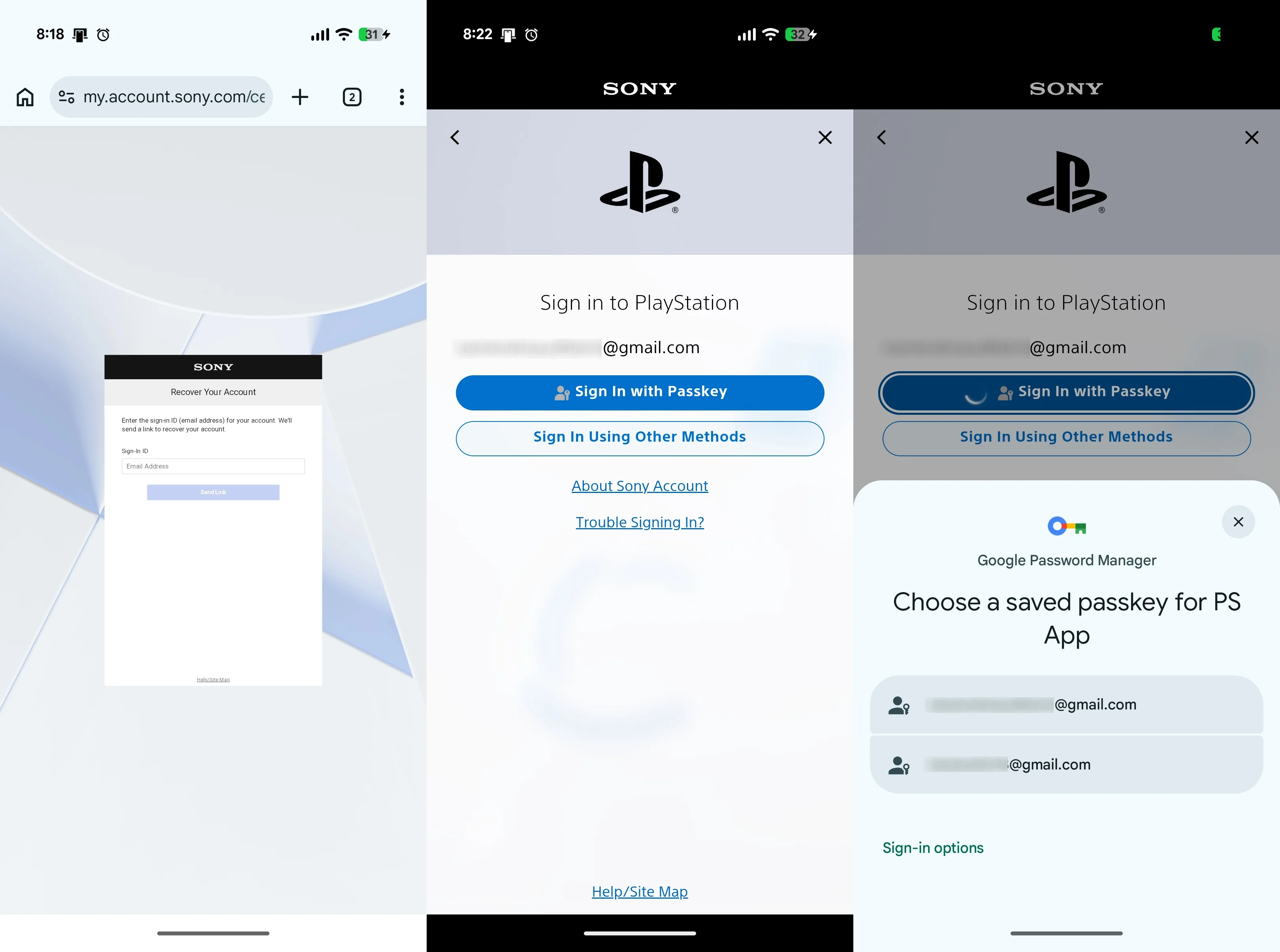
6. Once you receive the recovery email, opt to set up a passkey, automatically disabling 2FA.
7. After the passkey is created, use it to log back into the PlayStation app.
The PlayStation App: Your Key to Account Recovery
Previously, PSN users could rely on 2FA via their consoles if SMS authentication failed. Unfortunately, that option has been removed. This transition raises questions about whether Sony is doing enough to support its users. For gamers who may not have easy access to backup codes or alternatives, it places an undue burden on their experience. Thus, if you can't receive a text, your only recourse is your backup codes. Thankfully, with this method, you can reset your access without waiting for codes. Once a passkey is established, it's associated with your password manager, so ensure you're equipped to manage that securely.
And this is the part most people overlook: understanding how to handle these security features can significantly impact your gaming experience. For instance, many users won't think about storing backup codes in a secure place until they face a 2FA failure. This lack of foresight can turn a simple game night into a frustrating experience. Security should enhance our gaming, not complicate it.
Future Implications and User Experience
As we look ahead, Sony's approach to account security will likely evolve further. The trend of integrating more robust security features while providing user-friendly recovery methods is something many tech companies are grappling with. If you're working in this space, you'll understand that balancing security and usability is key. The move towards passkeys is a noteworthy step, reflecting broader shifts in the industry.
However, whether this latest method is effective long-term remains to be seen. Some users may find passkeys difficult to grasp, and the question of whether Sony plans to enhance user education around its 2FA processes could mean the difference between a smooth experience and a frustrating one. Ultimately, how well Sony addresses these issues might not only affect user sentiment but also retention in an increasingly competitive gaming market, where alternatives abound.
What this means for you is the need to stay informed. As Sony continues to adjust its security protocols, staying up to date on best practices could save you time and frustration down the line. With each change, there’s bound to be an adjustment period, and being prepared can make all the difference in keeping your gaming sessions uninterrupted.