Revamped Gemini UI with Blurred Background Begins Rollout to Android Users
Key Highlights
- Google is launching an updated Gemini AI overlay, first revealed at Google I/O.
- The refreshed interface is becoming available on both Pixel models (such as the Pixel 10 Pro XL) and Samsung devices (including the Galaxy S26 Ultra).
- This new design replaces the previous floating box with a distinct blurred backdrop.
Google is progressively rolling out a refined Gemini UI on Android, shifting the design of the AI overlay. Announced at Google I/O, this update is now reaching select users on Pixel and Galaxy devices. The choice of devices is particularly telling; it signifies an effort to widen the appeal of Gemini beyond just the Google ecosystem. Both Pixel and Samsung are significant players, suggesting that Google is considering cross-platform usability and user experience in its strategy.
A user on Reddit spotted the redesigned Gemini UI, while others reported it on devices like the Galaxy S26 Ultra and Pixel 10 Pro XL. This broad hardware compatibility indicates that the update is not limited to just Pixel phones. It seems to be controlled server-side, suggesting that an update to the Google app won't guarantee immediate access for all users. This approach can be both a boon and a bane; it allows Google to test features with a smaller audience first, but it can also lead to frustration among users eagerly awaiting their turn.
The standout feature of this update is the shift from a simple overlay to a more immersive experience with a blurred background. This visual change may look aesthetic, but it carries more weight than that. The underlying content remains recognizable yet softened, effectively distinguishing Gemini from the active app or home screen without completely obscuring it. This nuanced approach to UI/UX can enhance user engagement since it allows users to retain context while interacting with the assistant. Given that many users already multitask on mobile, this shift could lead to smoother interactions with the Gemini AI.
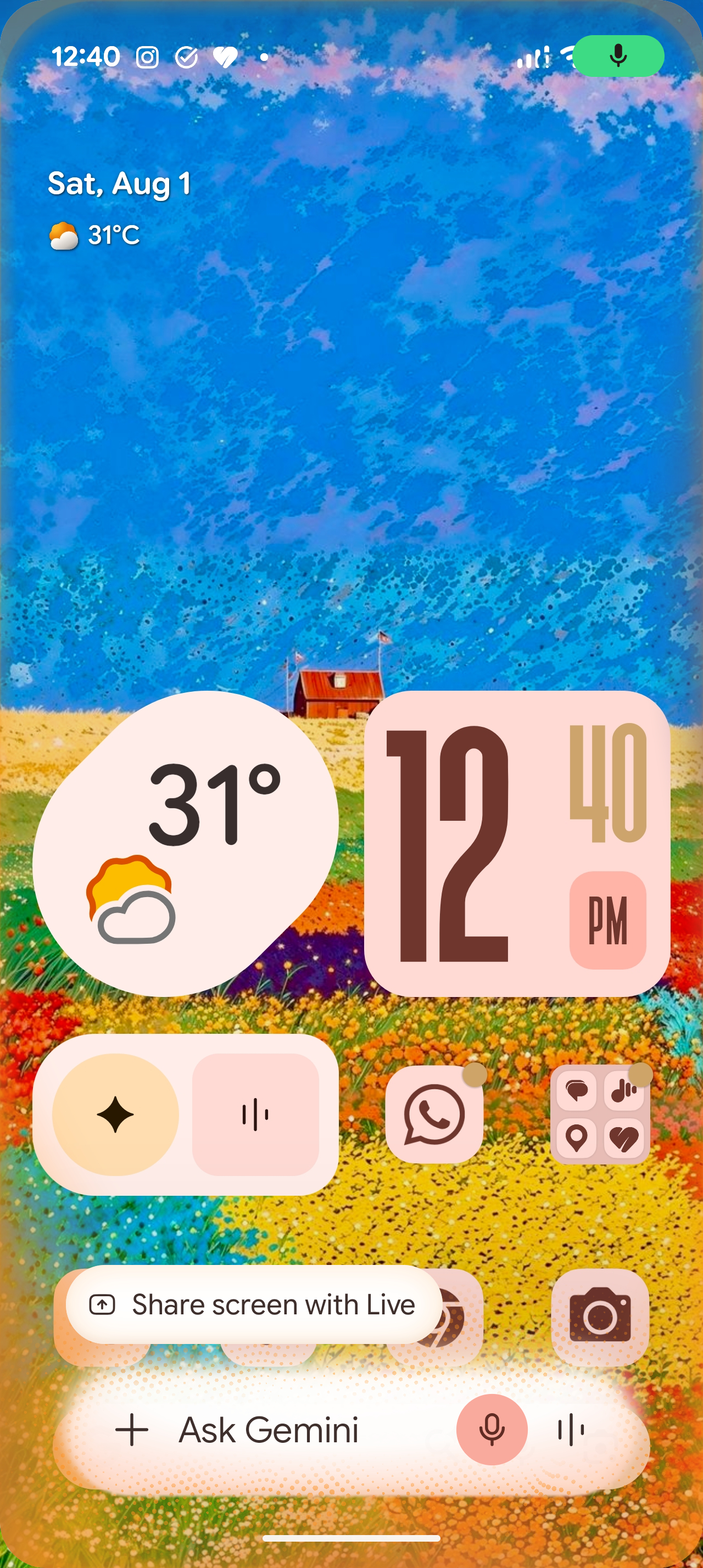
This update builds on a series of improvements to the Gemini overlay throughout the year, which included thinner icons and Dynamic Color support. Notably, Gemini Live now maintains interactions within the overlay rather than switching to a separate screen. Such enhancements might seem superficial but they play a significant role in how users interact with their devices. By eliminating the need to jump between screens, Google is aiming for a smoother, more intuitive experience where users can focus on tasks without unnecessary distractions.
Currently, there isn't a visible opt-in for this update, so if your Gemini interface looks unchanged, you might have to be patient for Google to activate this feature on your device. That lack of control raises questions about how user experience can be greatly affected by server-side rollouts. Google may tout the benefits of controlled testing, but this often leads to disparate experiences depending on when features become available. If you're working in this space, this could serve as a reminder of the unpredictability that can accompany software updates.
Thoughts on the Update
The new design is appealing, as it creates a sense of cohesion with the Android environment rather than appearing as an unrelated panel. The blurred background provides context while keeping the assistant easily accessible, promoting cleaner and more focused interactions. This level of integration is increasingly important as users expect their mobile interfaces to enhance productivity rather than hinder it. However, the server-side rollout can be frustrating, as it makes it difficult to anticipate when the redesign will be rolled out to everyone, even among users with identical app versions. This inconsistency can negatively impact user sentiment, prompting some to question the reliability of future updates.
Implications and Future Outlook
This update suggests a larger trend within the mobile ecosystem: the push for a more interconnected and user-friendly experience. Google's focus on blending the Gemini AI more naturally into the Android interface indicates an awareness that user interactions are evolving. The functionality of AI isn't just about providing answers; it’s about creating a seamless experience that feels intuitive and natural. The road ahead looks promising, but Google needs to address the rollout mechanics to avoid user dissatisfaction. The potential benefits of this new interface are sizable—if executed effectively, it could lead to increased user retention and engagement. But if the server-side deployment continues to create disparities, Google risks alienating its user base—a precarious position considering the competitive landscape of mobile AI tools. The challenge will be ensuring that updates don't just look nice; they must integrate smoothly into everyday user behavior. That’s where the real value lies. The future might not just be about flashy interfaces but rather how well they support the tasks users want to accomplish (and this is the part most people overlook). Balancing design, functionality, and user satisfaction will dictate whether Google's Gemini overlay continues to flourish or falters under the pressure of expectations.