Enhancing Conversations: Google Messages Introduces Keep Notes and Custom Themes
Google Messages is stepping up its game with two significant updates as part of the September Android Drop: integration with Google Keep and the addition of custom chat themes. These features aim to enhance the way users interact within conversations.
Integration with Google Keep: A New Dimension of Communication
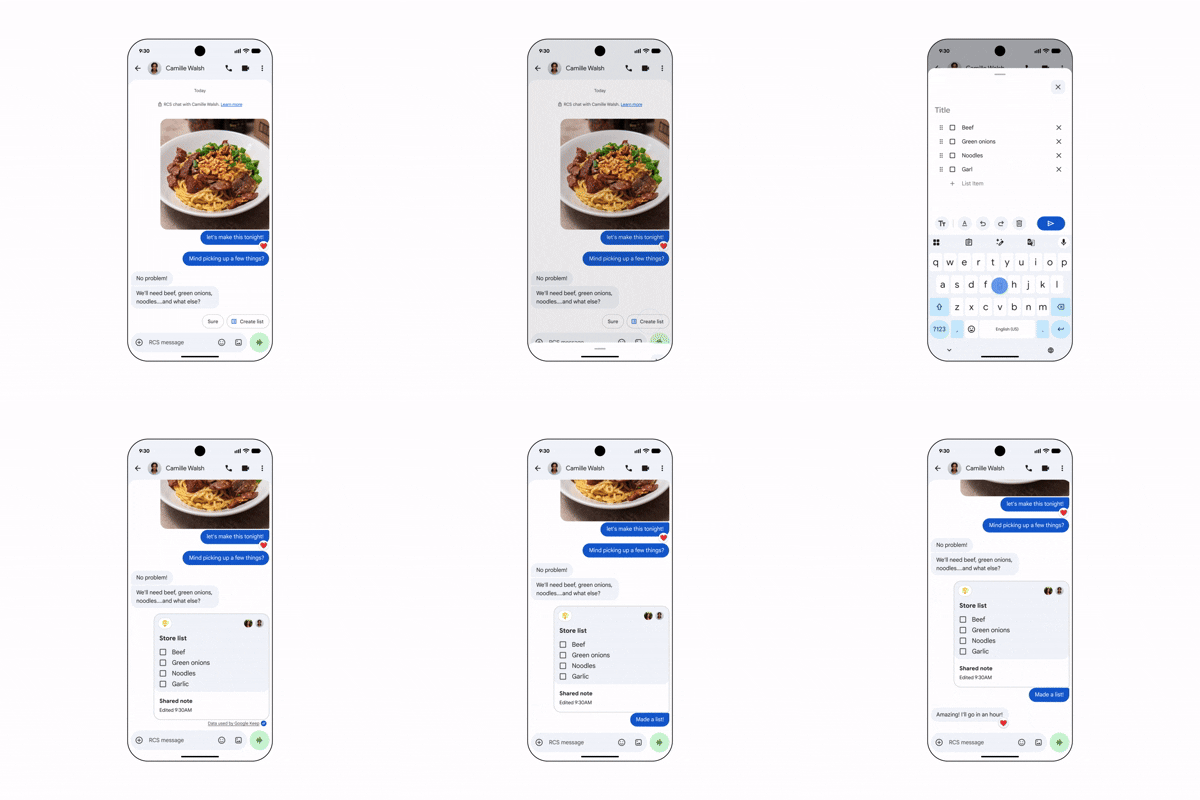
The new Google Keep integration allows users to add notes directly into a Messages chat with a simple tap of the plus button. This means that everyone in the conversation can view, edit, and contribute to shared notes—ideal for organizing grocery lists or planning trips together. It's a smart move that transforms group discussions into actionable planning sessions.
This integration reflects a growing trend among messaging apps seeking to offer tools for productivity. Group conversations often get bogged down with scattered information and missed details. Incorporating note-taking directly into messaging isn't just convenient; it aligns with how people are using technology to collaborate efficiently in real-time. A feature like this could easily take the place of dedicated task management or note-sharing apps, streamlining workflow into a singular, familiar platform.
Custom Chat Themes: Personal Touch to Every Conversation
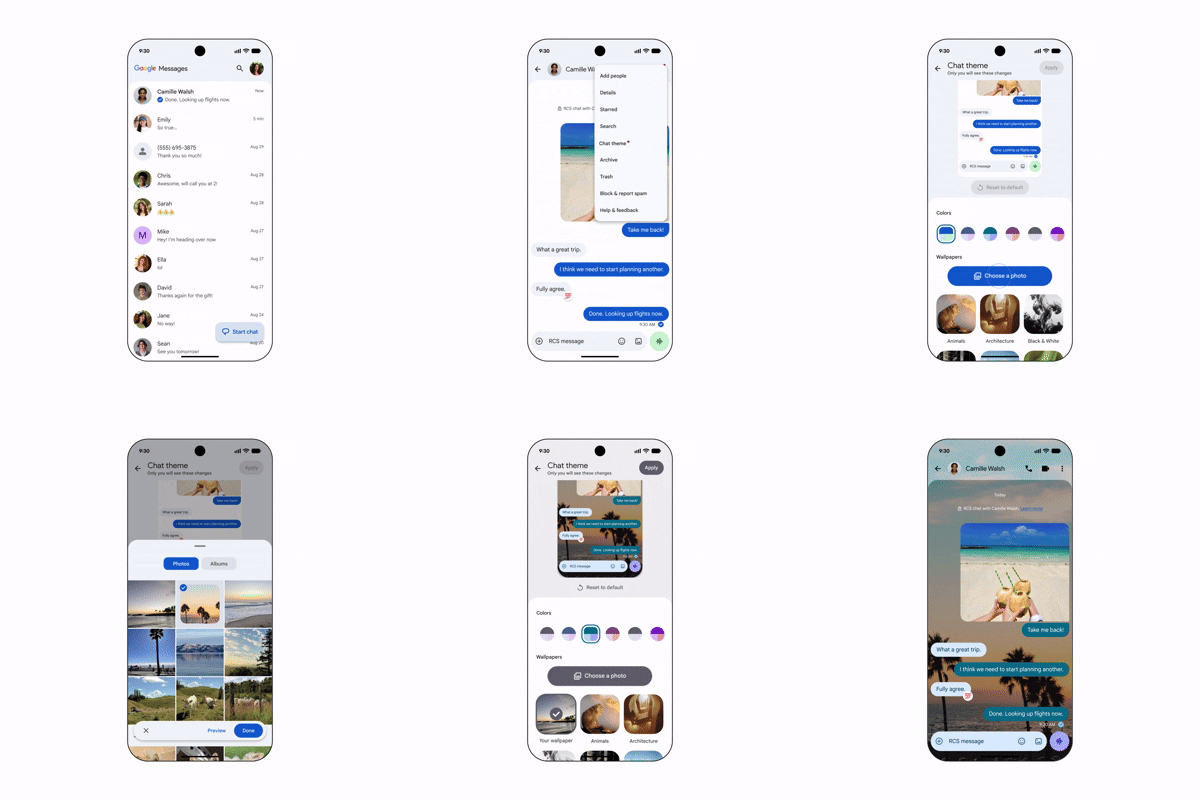
Alongside Keep notes, Google is rolling out custom chat themes that enable users to personalize their chat backgrounds. Options include curated wallpaper collections such as Animals, Landscapes, or Space, or users can upload their own images. This feature allows for a distinct touch in conversations, letting users choose themes that reflect their personalities or the vibe of the chat.
Customization has become a crucial aspect of user experience in messaging apps. The ability to set a specific theme can enhance user engagement, making conversations visually appealing. Google suggests everything from a calming beach scene for vacation planning chats to playful themes for chats with friends. The chat bubble colors will automatically adjust to align with these themes, creating a cohesive visual experience that enhances communication. This isn't just about aesthetics; it's about creating emotional connections through personalization.
The previous basic color options were functional but limited. Now, users can express themselves in a way that resonates more deeply. Think about the last time a vibrant image or a well-chosen theme set the mood—or even sparked a conversation. It adds layers of meaning to exchanges that text alone often lack. If you're working in this space, understanding the psychological impact of visual elements on communication can shape your design strategies.
Confirmation and Future Implications
Both of these features were recently confirmed in a Google Messages Community post, marking a significant enhancement in user interaction capabilities. As Google rolls out the September Android Drop to compatible devices, expect these features to play a central role in future conversations.
This development isn't merely about adding features; it signals a strategic pivot in how Google intends to position Google Messages against competitors like WhatsApp and Apple's iMessage. As communication behaviors evolve, so too must the platforms that facilitate them. By enabling tools that blend productivity with personalization, Google is seeking to reclaim a larger share of user engagement in the messaging category.
And here’s the part most people overlook: the broader implications of these new features could influence how developers approach messaging app design in general. Expect to see more integration of productivity tools in messaging, blurring lines between different types of apps. The competition will likely feel pressure to innovate similarly, which could drive further advancements.
Looking Ahead: User Experience or Feature Overload?
The additions of notes and themes present exciting opportunities for enhanced communication, but there's also a looming concern about complexity. What this means for you, the user, is that while features can enrich interactions, they also require learning and adaptation. Too many features can overwhelm. It's a delicate balance. Future updates will need to focus on making these capabilities intuitive and user-friendly to avoid alienating users who prefer simplicity over a cornucopia of options. As Google navigates this transition, it’s essential to maintain a focus on user experience. If they get it right, they could dramatically change the way we interact through texts, not just within Google Messages but for other platforms, too. The stakes are high, and the approach will be scrutinized as users begin to adapt to these changes.