Google's Chrome on Android May Require Biometric Verification for Password Autofill
Oct 02, 2026
488 views
Google is enhancing security measures in Chrome for Android by introducing a feature that requires biometric authentication before autofilling saved passwords. This update has reemerged in the Chrome Canary build, signifying the company’s commitment to bolstering user privacy.
Background on Password Security in Browsers
In today's digital ecosystem, password security has become a pressing concern for users and developers alike. With increasing incidents of hacks and data breaches, the necessity for enhanced security measures can't be overstated. Browsers serve as gateways for personal information, meaning their approach to password management significantly impacts user safety. According to various studies, a high percentage of internet users reuse passwords across different services, putting them at higher risk. That’s why improvements to password autofill functions, like Google's introduction of biometric authentication, are particularly promising.The Resurgence of Biometric Authentication
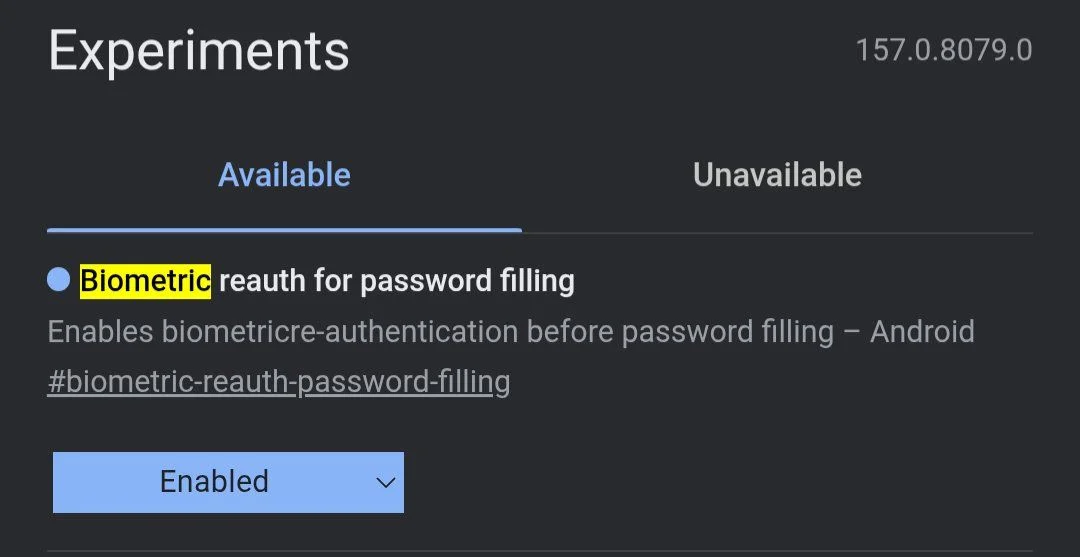
Previously, Google had tested this biometric check over a year ago—it was meant to add an extra layer of security by requiring users to confirm their identity with fingerprint recognition or facial scanning. While the feature initially seemed like a logical step, it was briefly sidelined, raising questions about the company's prioritization of user security. Now, it’s back with a dedicated flag labeled “Biometric reauth for password filling,” which was first spotlighted by @Leopeva64 on social media. The momentum behind this resurgence highlights a growing recognition within the tech world about the importance of securing password management functions. As digital threats evolve, the methods developers use to protect user data must adapt accordingly. Biometric systems have proven effective in other areas; they can offer a practical solution to bolster security in a straight-forward way that most users can easily understand and implement.How the Feature Enhances Security
When this functionality is activated, users will need to authenticate themselves before Chrome reveals a saved password, thereby preventing unauthorized access even on an unlocked device. Previously users could access all saved credentials simply by unlocking their phones. This new requirement could reduce security risks associated with password management considerably. There's a clear distinction here between unlocking a device and securely accessing sensitive information. Unlocking a phone doesn't always verify the user’s identity; anyone with a user’s unlocked phone could access sensitive data. The updated protocol aims to prevent just that, clamping down on a common vulnerability in password management. This change addresses potential vulnerabilities in the Google Password Manager, where password autofilling wasn't previously secured in the same way apps handle this function. Other password-filling applications have already incorporated biometric authentication, making it a significant addition for Chrome, as it lags behind competitors in this respect.Comparing Approaches: Chrome vs. Competitors
Google has hinted at this update for some time now, and the resurgence of testing in the Canary channel suggests ongoing development. Unlike Apple's existing system, where iPhones utilize Face ID or Touch ID for autofilling passwords in Safari, Google’s approach appears to focus specifically on reauthentication just as users access saved passwords. It’s interesting to draw parallels with other platforms. Apple's seamless integration of biometric authentication has made it an industry standard. This sets a high bar; if Google’s update doesn't reach a similar level of user-friendliness, it risks being perceived as an inadequate response to password security issues that aren’t exclusive to their ecosystem. And yet, some might argue that Google’s architecture allows for greater flexibility. The underlying Chrome browser isn't solely reliant on Android; it's available across multiple operating systems. This could potentially open avenues for wider adoption of secure practices, provided the implementation feels seamless across platforms.Implications of the Upcoming Feature
If implemented, this feature would mean that simply swiping open a device wouldn’t grant unrestricted access to sensitive information stored in Chrome. This shift in how passwords are accessed could lead to an industry-wide reevaluation of practices. There's potential for similar functions to appear in other browers or applications, creating a ripple effect that raises the standard for security across all devices. Still, the timing of this feature's rollout raises questions. As it stands, this feature is still in its testing phase within Chrome Canary, and Google has not indicated when it might roll out to the broader user base. For those waiting, it feels like you're on the sidelines of a game that’s just not starting. If you're working in this space, knowing that Google is testing enhanced security features could influence how you think about your personal and organizational use of browsers. It's clear that users are increasingly aware of their digital footprints, and this update could be the push many need to strengthen their password practices. However, whether Google’s efforts will be enough to regain ground in a competitive market remains to be seen. Without doubt, how well this feature is adopted and its impact on user behavior will provide insight into broader trends in tech security.