Google Maps’ New Routing Preference: How to Speed Up Your Commute by Changing Settings
Google Maps has recently tweaked its routing algorithm, favoring paths that promote fuel efficiency instead of the fastest routes. For those who find themselves arriving later than anticipated, this default setting is likely to blame.
While this change reflects a commendable aim towards environmental responsibility, it inadvertently prioritizes time versus fuel savings on your behalf. If your goal is to reduce travel time, disabling this setting is essential. Here’s how you can regain control over your route options.
Understanding Google Maps' Shift to Fuel Efficiency
The updated algorithm from Google analyzes a variety of factors, including driving behavior and terrain, to minimize fuel consumption. This newly designed routing favors routes that encourage steady acceleration and consistent speeds while reducing the need for braking. While theoretically beneficial, this approach can create complications during real-world commutes.
The rationale behind Google's algorithm is straightforward: by emphasizing fuel efficiency, the platform aims to contribute to environmental sustainability while simultaneously helping users save on fuel costs. However, here's the thing: this change can lead to extended travel times that may frustrate users who prioritize quick commutes. For instance, a route that avoids highway ramps to ensure smooth acceleration might result in a commute that takes 10 extra minutes. Similarly, opting for a route that steers clear of congested areas to maintain a steady speed might add 15 minutes compared to pushing through heavier traffic.
Google's algorithm operates under the assumption that saving fuel is more crucial than minimizing time; for commuters or anyone with urgent travel needs, this can result in significant delays. As people grow more reliant on their navigation apps, this shift could pose challenges, particularly during rush hours or when trying to make it to appointments. The trade-off between time and fuel expense is a delicate balance that many users might not be ready for.
How to Switch Back to Faster Routes on Google Maps
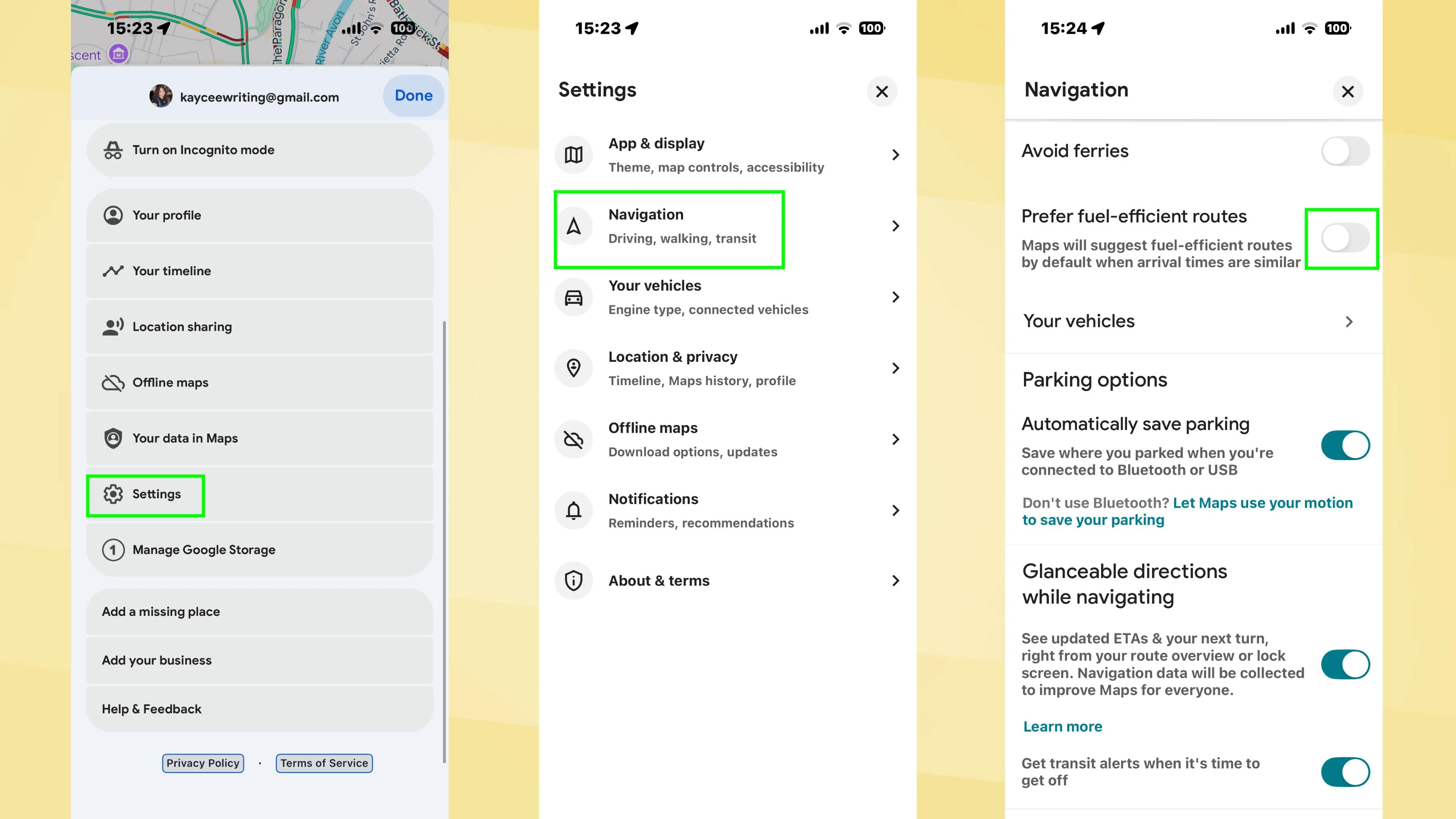
To adjust your settings, open Google Maps and tap your profile icon in the top right corner. Select Settings, then Navigation, and scroll down to "Prefer fuel-efficient routes" to toggle it off. This will default your navigation back to the quickest available route.
Once this feature is disabled, you won't encounter the leaf icon denoting fuel-efficient options, and the fastest route will automatically be your primary suggestion. It’s a simple process, but one that’ll make a significant difference on the road. Many people might overlook this step, choosing convenience over customization, but taking just a moment to adjust settings can save you precious minutes during your travels.
Customizing Your Routes for Flexibility
If you prefer not to disable fuel-efficient routing entirely, you can opt to keep it enabled and manually select your preferred route. However, it's crucial to approach this with a proactive mindset. Before hitting start, take a moment to review the available routes and their respective arrival times. Although a fuel-efficient route might add only three to five minutes to a typical 20-minute commute, those minutes can accumulate significantly over longer trips.
By checking your options ahead of time, you’re empowered to make choices that align with your specific travel needs at that moment. If you're working in this space, you might find that different routes offer varying levels of convenience versus savings. Especially during peak traffic hours, the ability to evaluate multiple options can make a big difference. Just remember: if you know you need to be somewhere on time, it pays to prioritize speed over efficiency occasionally.
The Importance of User Control in Navigation Services
As users increasingly depend on apps like Google Maps, maintaining control over navigation preferences becomes essential. Features that emphasize one aspect over another can alienate segments of the user base. Not everyone has the luxury of preferring fuel efficiency over being punctual, and decisions made at the algorithm level should recognize this diversity in user priorities.
This trend isn't limited to Google Maps. Other navigation platforms are similarly updating their algorithms, often pushing broader goals like environmental sustainability, but doing so at the potential detriment of time-conscious users. The growing reliance on artificial intelligence in these systems needs continuous monitoring to ensure it reflects the diverse needs of its users.
With greater awareness among users regarding settings that influence their daily commutes, developers might face pressure to create more customizable options. Features that allow for individual preferences to be reflected in algorithms can lead to a better user experience—all while still achieving broader sustainability goals.
And yet, those aiming to balance their environmental responsibility with their day-to-day urgency must stay vigilant. Users need to remember that even small changes in algorithms can lead to disruptions in their routines, which may not suit their travel needs or responsibilities.
Future Outlook for Navigational Technologies
The trajectory for navigational technologies, as seen with Google Maps, suggests an increased emphasis on integrating sustainability with user preferences. However, as algorithm updates continue to roll out, the true challenge will lie in how well these systems adapt to varying user demands. Many will want the speed of travel served up alongside environmental concerns, pushing app developers to find a harmonious balance.
This could lead to potential shifts in how features are structured, possibly introducing tiered settings based on user-defined priorities. For example, users might be able to select a primary goal—whether it be time, fuel efficiency, or a combination. With advancements in machine learning, we might see algorithms that dynamically adjust based on traffic patterns, weather conditions, or even user behavior, enabling a more personalized experience.
For now, users must remain active participants in their navigation experience, ensuring settings align with their actual needs. Simultaneously, the tech giants behind these applications will need to listen closely to feedback from their user base to adapt wisely. The question lingering is: How will they respond to the call for more flexibility before it impacts their usability? Time will tell.