Pixel 10 Owners Get Gemini Intelligence and Custom Widgets in November Drop
Gemini Intelligence lands on last year's flagships
Pixel 10 owners just received a batch of features that Google had reserved for the Pixel 11. The November Pixel Drop brings Gemini Intelligence to last year's flagships, and that's the most significant change here. This isn't a cosmetic refresh. Phone makers typically save headline capabilities for the newest hardware, partly to give buyers a reason to upgrade and partly because the latest chips can run those features more smoothly. Seeing them move back a generation is less common, and it's worth asking why.
According to Google's official announcement, the update adds Gemini's multi-step task handling and personalized suggestions to the Pixel 10 series. It also brings Rambler, a feature that had been limited to the Pixel 11. The announcement doesn't spell out what Rambler does, so I won't guess. My read is that the multi-step handling matters more than the branding. Here's the thing: the branding gets the headlines, but the plumbing is what changes your day.
Say someone texts asking when you'll arrive while you're already in Google Maps. Your phone can surface a suggestion and a relevant action based on what you're doing, without you switching apps. That's the pitch, and it's a sensible one. The catch is that proactive help like this depends on the assistant reading your context accurately, and on you being comfortable with it reading that context at all. (And this is the part most people overlook.) Every suggestion like this is a small trade of access for convenience, so it's worth deciding where you draw that line before the prompts start showing up.
Describe a widget instead of hunting for one
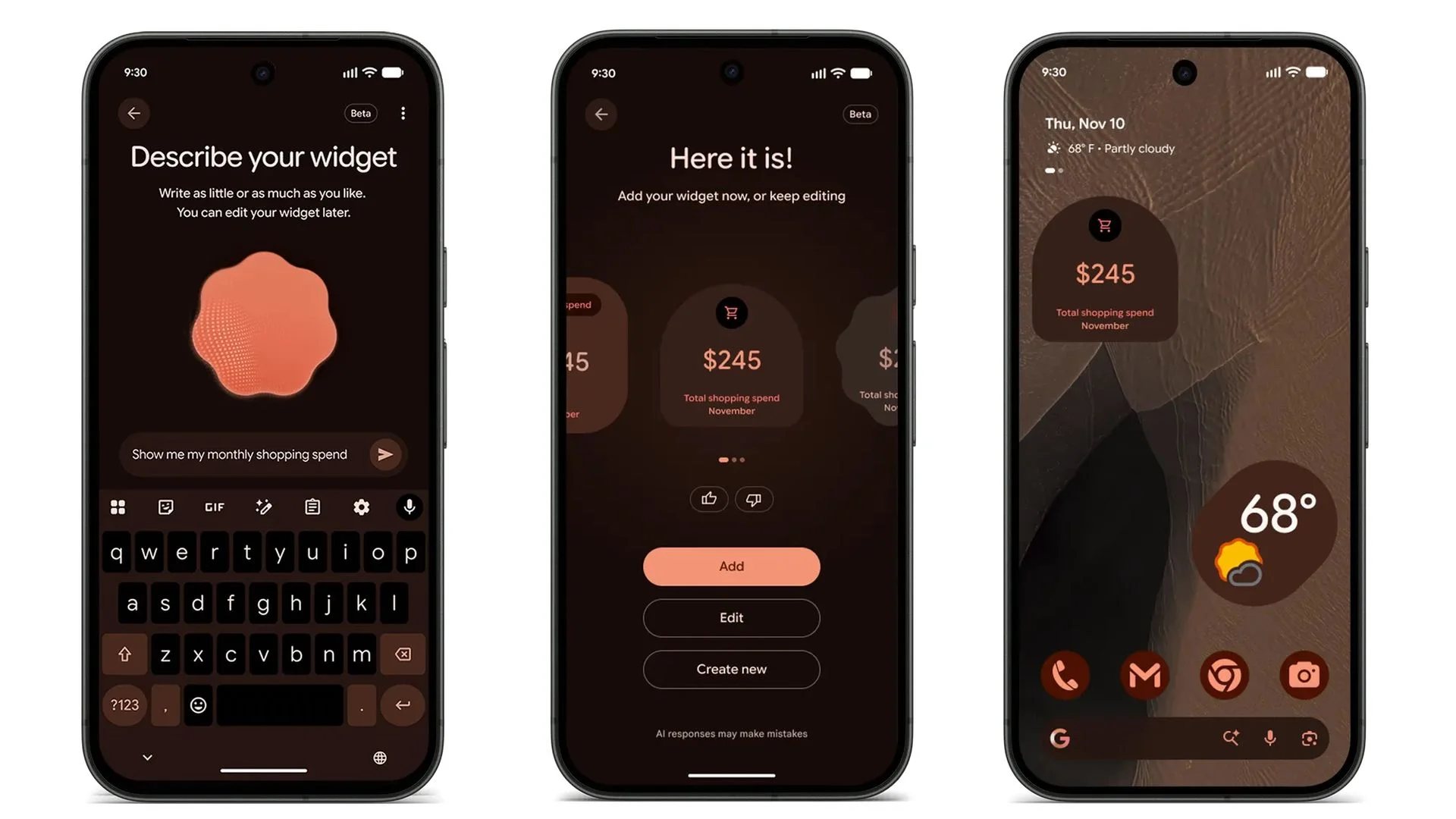
Create My Widget lets you type a natural language prompt and have Google generate a home screen widget for you. You skip digging through existing widget libraries. If you've ever scrolled through a long list of options looking for one that shows exactly the information you want, the appeal is obvious. Describing what you want is a more direct interface than browsing categories, and it shifts the work from you to the model. It works on the Pixel 10 and Pixel 11 series, though the Pixel 10a is missing from the list. That gap matters if you bought the 10a expecting the same software treatment as its bigger siblings. This category of feature often reaches the pricier hardware first, and the 10a's absence fits that pattern.
Matching icons and wider search
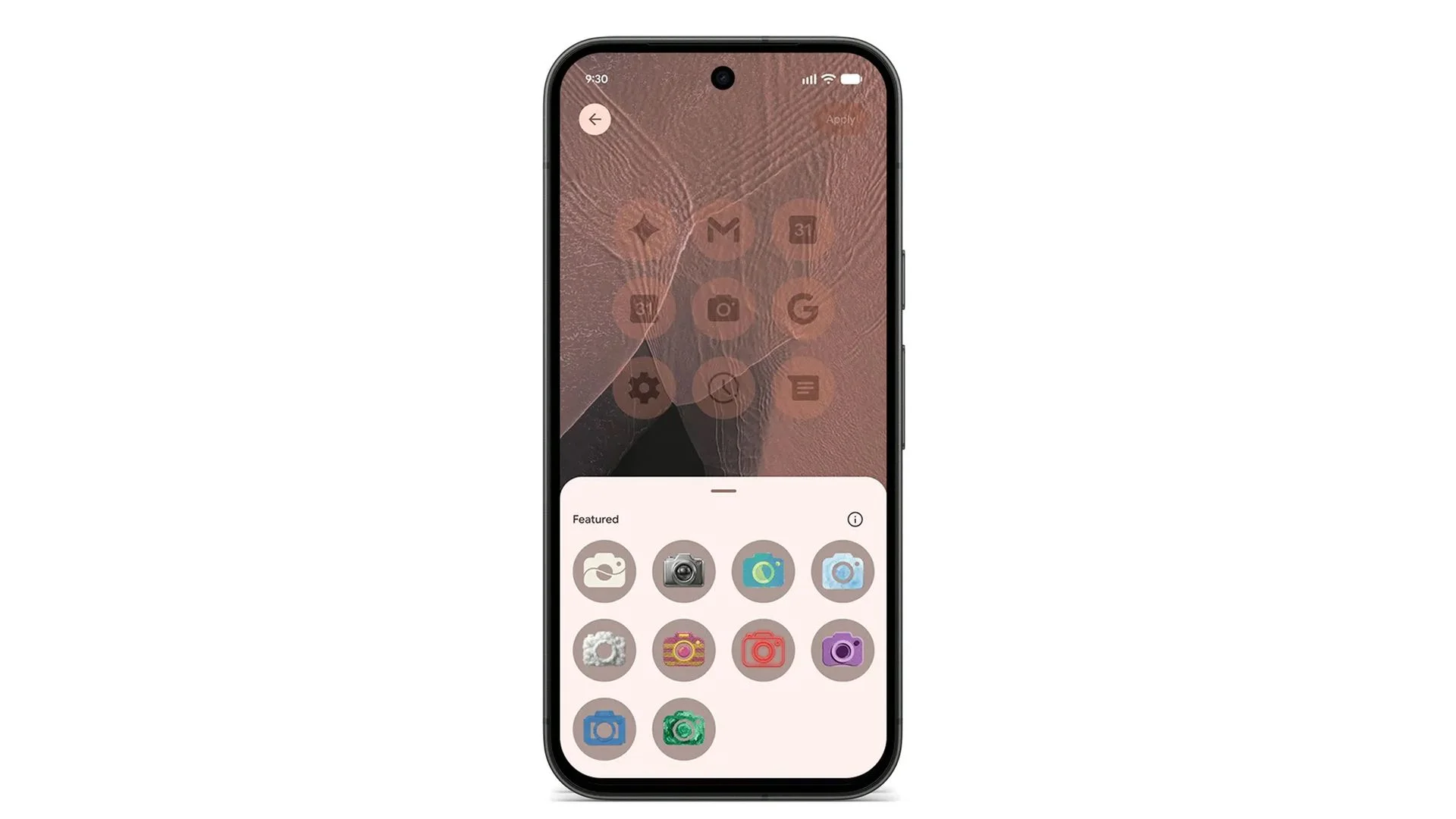
Google has added 10 custom icon styles that use its Nano Banana AI model to generate matching app icons. The result is a more consistent home screen, though it's still a visual layer rather than a functional change. Nobody's phone gets faster because the icons match. But people spend a lot of time looking at their home screens, and a tidier grid can make a phone feel more like yours. That's a fair reason to care, even if it won't show up in a benchmark. Launcher customization features like this tend to draw attention, but they rarely change how a phone performs.
Pixel Search is the update I'd expect people to use most. It now reaches Pixel 6 and newer devices, letting you search across apps, messages, photos, emails, and device settings from one place. Older Pixels get a real search upgrade here, not a token one. Search quietly determines whether a phone feels fast or frustrating, because most of us reach for it when we've already lost track of something. Useful. Not flashy. Probably the most practical item on the list.
Pixel 11 keeps a few exclusives
Google is still saving some features for its latest phones. Call Screen gets a Gemini upgrade on the Pixel 11, letting the assistant hold more natural conversations with unknown callers while showing a live transcript on your screen. HiLight on the Pixel 11 Pro now lights up when a Google Messages notification arrives. Third-party apps like WhatsApp and Telegram still aren't supported, which limits the feature for anyone who lives in those chats. That last point is the one that stings. Plenty of people run their social lives through apps other than Google Messages, and a notification feature that skips them is only partly useful to those users.
Pixel Tag goes on sale
Google has also made the Pixel Tag available. Google first unveiled the tracker alongside the Pixel 11 in August. It costs $29.99 on its own or $99.99 for a four-pack. It runs on Google's upgraded Find Hub network and supports ultra-wideband for precision tracking. If you're tagging more than one item, the four-pack is the better deal, working out to roughly $25 a tag. Tags like this only work as well as the network of devices that can detect them, so the Find Hub upgrade matters as much as the hardware. Ultra-wideband generally gives finer distance readings than basic Bluetooth trackers, which helps when you're hunting for keys under a couch cushion and not just somewhere in the house.
Rollout timing
Google says the update started rolling out on November 10 and will reach supported devices over the next several weeks. Expect a staggered arrival. If your phone still shows the old build, that's normal. Staged rollouts are standard for updates of this size, because they let the company catch problems before every device is affected. The feature list on the announcement page and what's on your phone today may not match for a while. If you're waiting on something specific, check the software update screen before assuming it's broken.
What this means for buyers
This drop also shows the gap between the Pixel 10 and Pixel 11 narrowing. If Google keeps moving flagship features down a generation, that's worth factoring in when you decide which model to buy. And yet the Pixel 11 still holds exclusives, from the upgraded Call Screen to HiLight on the Pro model. So the gap isn't closing so much as shifting. Newer hardware keeps an edge on a handful of features, while software that once justified an upgrade reaches older phones.
That matters for how you think about phone purchases. If you're weighing a Pixel 10 against a Pixel 11, the question isn't just "what's new?" It's "which of these features would I actually use?" Many of the headline items here are things you could get on last year's model. If you're managing devices for a team or building software for Android, the pattern is worth tracking. When a vendor backports a feature, it often signals confidence in that feature's stability and a reluctance to let hardware alone drive sales. I'd call that a healthier signal than the old habit of holding everything back. Whether Google keeps this pace is something to watch, and I won't pretend to know yet.