Samsung Gallery Now Backs Up Straight to Google Photos With Galaxy Sync
Galaxy Sync matters less for the backup itself than for what it does to Samsung's own gallery. Photos and videos now move to Google's cloud in the background, and you never have to open Google Photos to make it happen. That sounds like a small change, but it shifts where your library lives in your head. Gallery has always been the place you look at pictures, while cloud backup was a separate chore you handled somewhere else. Galaxy Sync folds those two jobs into one screen, and I think that's the right instinct.
Backup without the app switch
Setup is short. Sign in with your Samsung and Google accounts, then enable the feature inside the Gallery app. From there, new media syncs automatically. If you've ever set up cloud backup and then forgotten to check whether it was actually running, you already know why "automatic" carries so much weight. Nobody wants to audit a settings screen every month, and most people never will.
Samsung's cloud backup story has been messy this year. The company ended its partnership with Microsoft OneDrive, and reports followed that Google would fill the gap. Galaxy Sync is that feature, and it's live now. Switching backup partners is never painless for users, because anyone whose photos were routed through the old arrangement has to figure out where their copies actually sit. Here's the thing: a company's cloud partner is effectively its backup policy, so the reported Google arrangement is the part I'd keep watching.
Cross-device access
The more practical change shows up across hardware. Snap a photo on your phone and it appears in Gallery on your Galaxy tablet, as long as both devices use the same accounts and have syncing turned on. You don't have to hunt through Google Photos on each device. That matters most if you bounce between a phone and a tablet and can't remember which one captured a given clip. The conditions are strict, though. Same accounts, syncing on, and if one device is signed into a different account, it won't behave the way you expect.
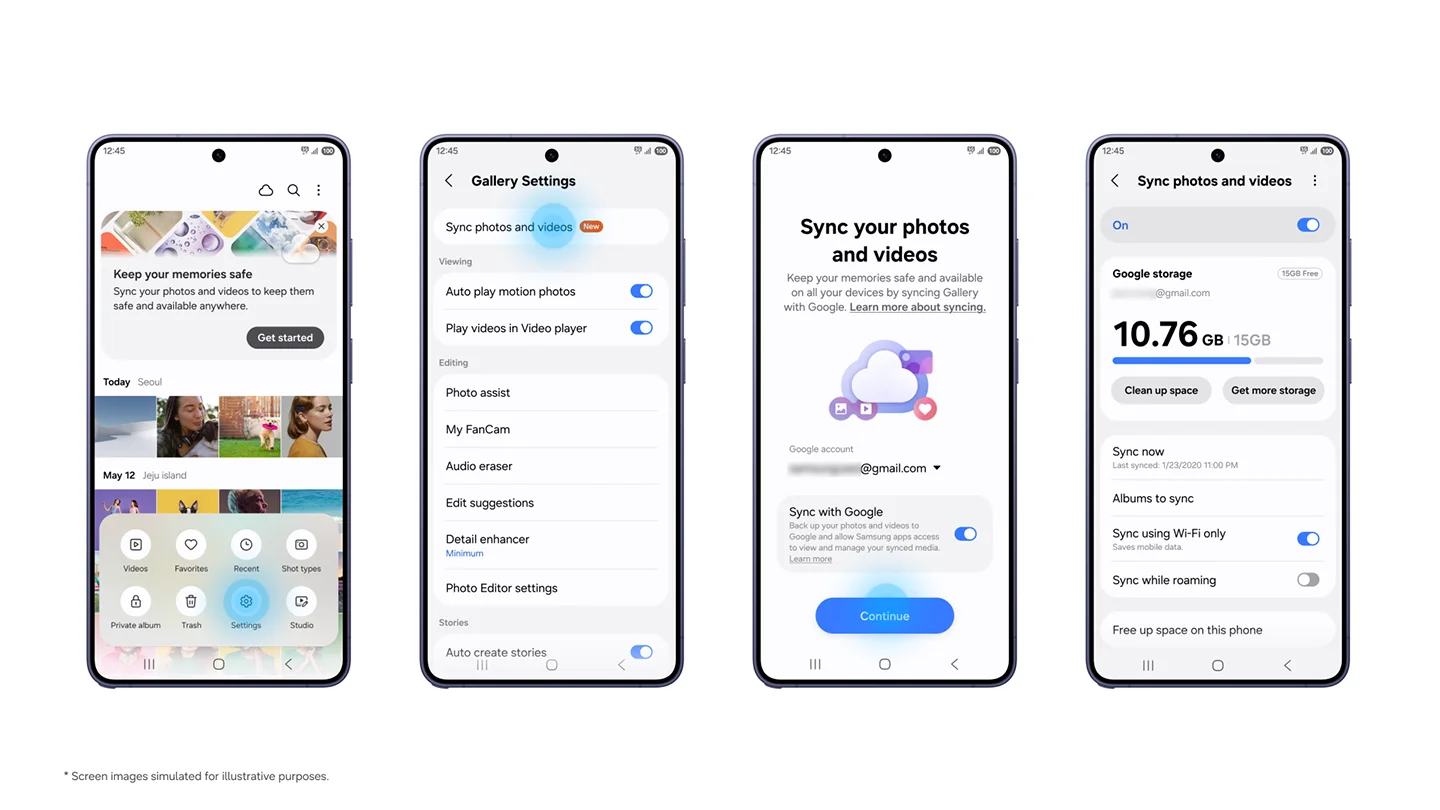
The image above is Samsung's own promotional art, so weigh it accordingly. It shows the intended result, not the edge cases. Vendor visuals almost always depict the clean path where accounts match and the network cooperates. Your experience will depend on the boring details, like whether your tablet is signed in under the same Google identity as your phone.
Freeing up phone storage
A new "Free up space on this phone" option removes local copies once files are safely backed up to Google storage. Gallery keeps showing thumbnails for those files, and you can pull down the originals whenever you need them. If your phone is always close to full, this is the feature that will matter most to you. The trade-off is familiar to anyone who has used cloud-offload features on other platforms: you reclaim device space in exchange for needing a connection when you want the full-resolution file. (and this is the part most people overlook) those thumbnails stay on the device, so the gallery looks complete even when the originals aren't there. That's convenient until you're on a plane or in a dead zone and want to show someone a specific video.
Where the storage comes from
Backups draw on the Google account storage you already have, the same pool that covers Google Photos, Gmail, and Google Drive. That's 15GB free. Heavy shooters will burn through it fast, and paid plans are the obvious next step. Google recently raised the storage in its Google AI Pro plan from 2TB to 5TB, which makes that upgrade path more appealing. I'll be blunt: a shared pool means one habit of recording lots of video can quietly crowd out your email and documents. That's a worse surprise than a full photo folder, because you won't see it coming until something stops working.
The catch
Galaxy Sync doesn't pull your entire Google Photos library into Gallery. Only photos and videos synced after you enable the feature show up across your Galaxy devices. Older content stays in Google Photos. This is the detail that would have saved me a confused hour if I'd read the marketing instead of the fine print. Picture someone with ten years of photos in Google Photos who turns on Galaxy Sync and then wonders why the tablet looks nearly empty. The library didn't vanish. It just never migrated into the new view, and that's a split experience you'll need to explain to family members who expect everything in one place.
Rollout
Galaxy Sync has started reaching devices running One UI 9. Samsung says availability will expand to more devices in phases, so timing will vary by model. If you're waiting, the practical move is to check for the Gallery update rather than assume your phone is included. Phased rollouts are common, and they frustrate people who see a feature announced and then can't find it in their settings. Samsung's wording leaves the schedule open, and I'd take that vagueness at face value rather than reading a date into it.
What this means for you
If you're working in this space, the interesting part isn't the sync engine. It's that Samsung is betting people would rather have their photos follow them through one app than manage a cloud service on the side. That's a sensible bet, and it also creates a dependency. The experience now rests on a partnership, a storage tier, and an account system that belongs to someone else. When a feature this central depends on another company's infrastructure, you're trading convenience for a longer chain of things that can change.
The open question is whether Samsung eventually lets Gallery show the full Google Photos library rather than only new synced files. For now, the feature covers what you back up from here on. That's the question I'd keep asking. A full-library view would turn Gallery into a true front end for the cloud, which is a bigger commitment than syncing new shots. Until then, treat Galaxy Sync as a forward-looking backup. Useful, but limited.